
1 Vulnerability Description
Recently, Drupal released a security advisory on the remediation of an access bypass vulnerability (CVE-2019-6342). In Drupal 8.7.4, when the experimental Workspaces module is enabled, an access bypass condition is created. In terms of the security risk, Drupal rates the vulnerability as Critical.
Reference:
https://www.drupal.org/sa-core-2019-008
2 Scope of Impact
- Affected Versions
- Drupal 8.7.4
- Unaffected Versions
- Drupal 8.7.5
- Drupal < 8.7.4
- Drupal 8.6.x
3 Vulnerability Detection
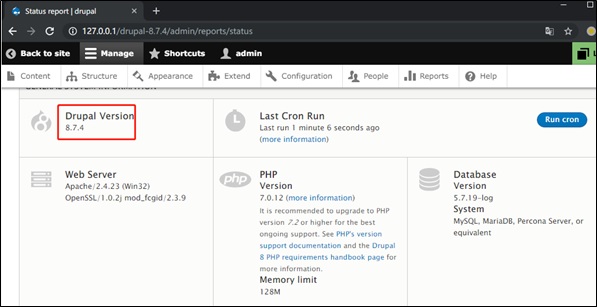
Drupal users can check whether they are affected by this vulnerability by logging in to the background and choosing Manage > Reports > Status report to view the version of the current application. If the version is 8.7.4, they are at risk.
4 Mitigation
4.1 Official Fix
Drupal has released a new version to fix this vulnerability. Affected users can visit the following link to download this version and upload their installation:
https://www.drupal.org/project/drupal/releases/8.7.5
5 Technical Analysis
5.1 Vulnerability Reproduction
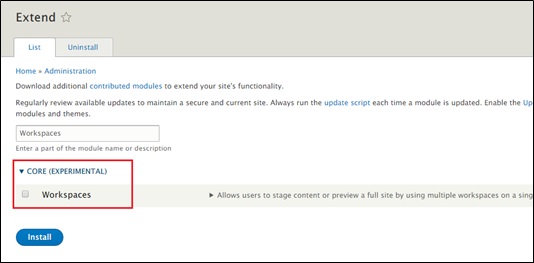
Install Drupal 8.7.4, log in as admin, access /admin/modules, select Workspaces, and click Install.
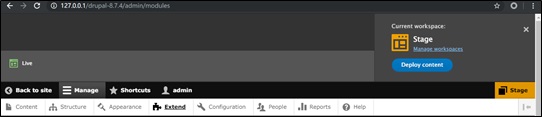
If a message shown in the following page appears in the upper right corner, the installation succeeds. You can switch between the Stage and Live mode.
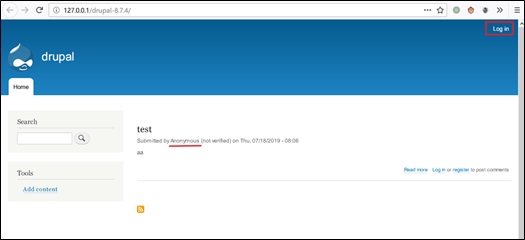
Use another browser to open the homepage of Drupal without logging in, and access http://127.0.0.1/drupal-8.7.4/node/add/article. On this page, you can directly add arbitrary articles without being required to have the author or administrator privileges.
5.2 Vulnerability Analysis
Workspaces is a new experimental module built into the Drupal 8.6 core. It allows website administrators to review and edit the content and then publish unlimited amounts of it all at once.
Workspaces can work in Stage or Live mode, with Live as the default one. The differences between the two modes are as follows:
- When Workspaces is in Stage mode, the edited content is not immediately updated. After all articles are edited, the administrator can publish them to the live environment by clicking Deploy to Live. That is to say, the Stage workspace is equivalent to a temporary depot.
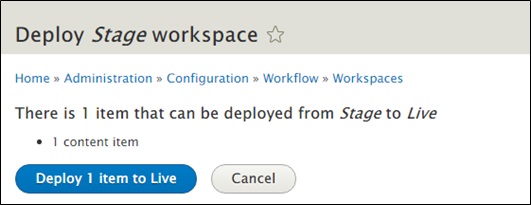
- The Live workspace is characterized by instant updates. That is to say, when an article is edited, the website content is immediately updated.
In either mode, there is a bug caused by incorrect coding: An anonymous user can create, publish, edit, and delete articles without login. The vulnerability stems from the authentication module EntityAccess.
When a user initiates a request, the system calls back the privilege check module to check the current user’s permissions. Specifically, in the RouterListener method of EventListener, the onKernelRequest() method calls the matchRequest() method of the AccessAwareRouter class, and then calls the checkRequest() method of the AccessManager class. Finally, in the performCheck() method of the AccessManager class, the call_user_func_array function calls back the corresponding operation for a specific permission check.
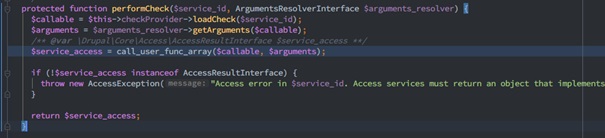
For example, access_check.node.add is called back when an article is published. The related method is defined in the NodeAccessControlHandler controller, which is inherited from EntityAccessControlHandler. In the createAccess() method of the parent class, the create_access permission for the corresponding operation is called back. In this process, the module name and related hook are spliced to constitute a callback function.
$function = $module . ‘_’ . $hook
Here the workspaces_entity_create_access() method is called back to enter Workspaces.
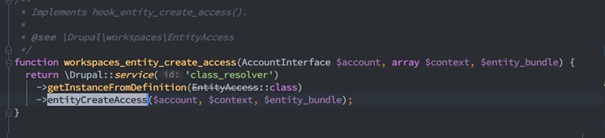
When the entityCreateAccess() method is called, there exists a key operation, bypassAccessResult.
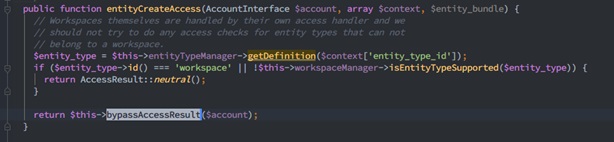
The bypassAccessResult() method checks whether the current user has the “bypass node access” and is specific to Workspaces. This method determines that “if a user is in his/her own active workspace, he/she has a full permission”. “Full permission” here refers to addition, deletion, and edit operations on articles.
This looks odd, but is actually a designed function. Normally, whether a user owns a full permission is configured in admin/people/permissions in the background. By default, anonymous and non-administrative authenticated users do not have such permission.
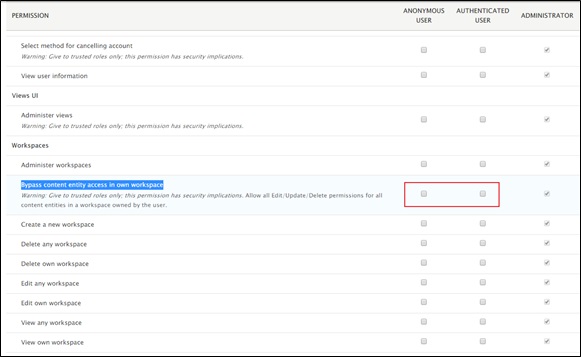
Only when “Bypass content entity access in own workspace” is enabled, can users publish and delete articles without logging in. The vulnerability in question bypasses this configuration, allowing privilege escalation by default.
Let’s look further into how bypassAccessResult() is implemented. In the process, the AccessResultAllowed object or AccessResultNeutral object is returned. “Neutral” means that the result may need to be further determined subsequently. However, as far as this vulnerability is concerned, the result is just “access” or “forbidden”.
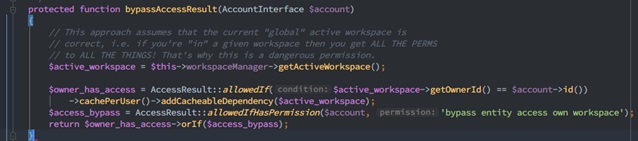
The method first obtains the current active workspace, then determines via allowedIf whether the current user has the permission, and finally saves this data to the cache, including the cached content, cache label, and expiration time. Subsequently, the method determines whether to create an allowed access result depending on whether the permission is present via allowedIfHasPermission. If the permission is not present, the user is not allowed access and a reason is provided. This mechanism works well by far. When no workspace permission is configured for anonymous users in the background, the AccessResultNeutral object is returned, indicating “forbidden”. Now comes the vulnerable part.
$owner_has_access->orIf($access_bypass);
By checking the patch, we find that, in the preceding statement, orIf is changed to andIf.
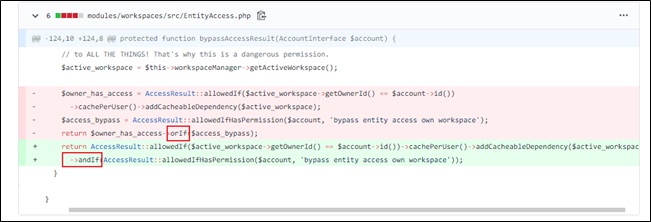
The design logic of the two methods is rather complicated. Their most important function is to make a judgment on the “Neutral” result. In the case of orIf, whether to allow access is up to the caller’s decision. In the case of andIf, access is directly prohibited.
As far as this vulnerability is concerned, the difference is shown in the following figures.
- orIf()
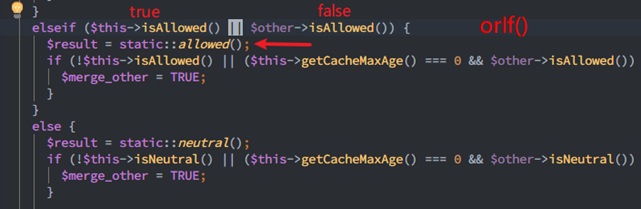
The AccessResultAllowed object is returned.

- andIf()
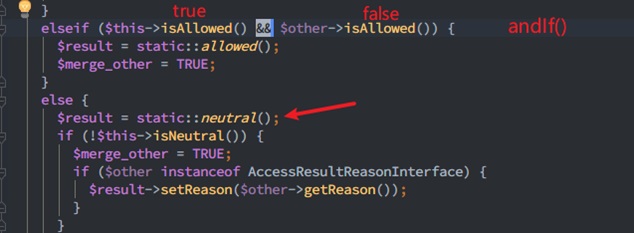
The AccessResultNeutral object is returned.
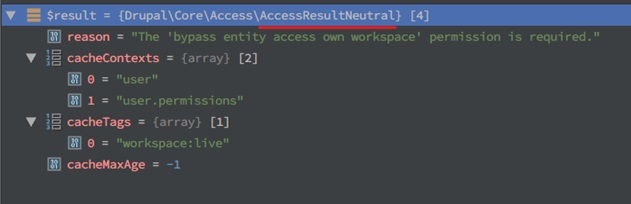
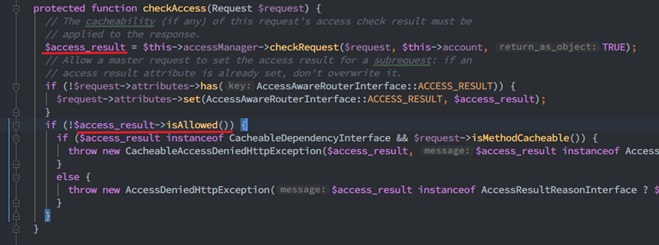
After the check is complete, we come back to the checkAccess() method of the AccessAwareRouter class. This method checks the returned result and so isAllowed() of AccessResultNeutral throws an exception.
On the page, a 403 Forbidden error is displayed, indicating access denied.
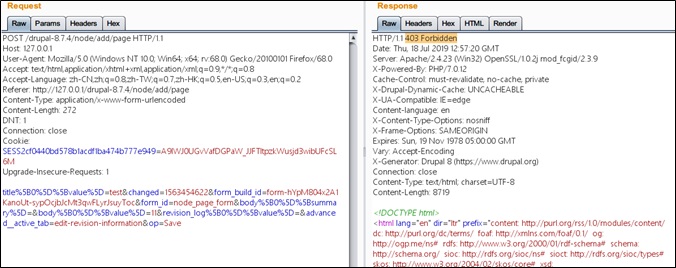
The related call stack is as follows:
Drupal\workspaces\EntityAccess->bypassAccessResult()
Drupal\workspaces\EntityAccess->entityCreateAccess()
…
Drupal\Core\Extension\ModuleHandler->invokeAll()
Drupal\node\NodeAccessControlHandler->createAccess()
Drupal\node\Access\NodeAddAccessCheck->access()
Drupal\Core\Access\AccessManager->performCheck()
Drupal\Core\Routing\AccessAwareRouter->checkAccess()
Drupal\Core\Routing\AccessAwareRouter->matchRequest()
Symfony\Component\HttpKernel\EventListener\RouterListener->onKernelRequest()
…
DrupalKernel.php:693, Drupal\Core\DrupalKernel->handle()
index.php:19, {main}()
5.3 Summary
This vulnerability stems from a slip in the design process. When no permission is granted in the default configuration, users can bypass access to publish, delete, or edit articles. However, as this vulnerability affects only Drupal 8.7.4 and can be exploited only when the Workspaces module (experimental function) is enabled, which is disabled by default, its impact is quite limited. Users can mitigate the impact of this vulnerability by upgrading their Drupal or disabling the Workspaces module.
Appendix
-
Statement
This advisory is only used to describe a potential risk. NSFOCUS does not provide any commitment or promise on this advisory. NSFOCUS and the author will not bear any liability for any direct and/or indirect consequences and losses caused by transmitting and/or using this advisory. NSFOCUS reserves all the rights to modify and interpret this advisory. Please include this statement paragraph when reproducing or transferring this advisory. Do not modify this advisory, add/delete any information to/from it, or use this advisory for commercial purposes without permission from NSFOCUS..
-
About NSFOCUS
NSFOCUS, Inc., a global network and cyber security leader, protects enterprises and carriers from advanced cyber attacks. The company’s Intelligent Hybrid Security strategy utilizes both cloud and on-premises security platforms, built on a foundation of real-time global threat intelligence, to provide multi-layered, unified and dynamic protection against advanced cyber attacks.
NSFOCUS works with Fortune Global 500 companies, including four of the world’s five largest financial institutions, organizations in insurance, retail, healthcare, critical infrastructure industries as well as government agencies. NSFOCUS has technology and channel partners in more than 60 countries, is a member of both the Microsoft Active Protections Program (MAPP), and the Cloud Security Alliance (CSA).
A wholly owned subsidiary of NSFOCUS Information Technology Co. Ltd., the company has operations in the Americas, Europe, the Middle East and Asia Pacific.

