
Function Description
This function will be released on ADS Version 4.5R90F04 in Q1 2023. The group-specific NTI is supported in ADS V4.5R90F04 as a supplement to the existing protection method.
Before using this function, choose Advanced > NTI > NTI Configuration and set Enable to Yes. The group-specific NTI policy supports Traffic Control by Dst IP and Block to minimize the impact.
Configuration Procedure
Choose Policy > Anti-DDoS > Protection Groups and click the edit icon in the Protection Policy column. On the displayed page, click Next to set group-specific NTI.
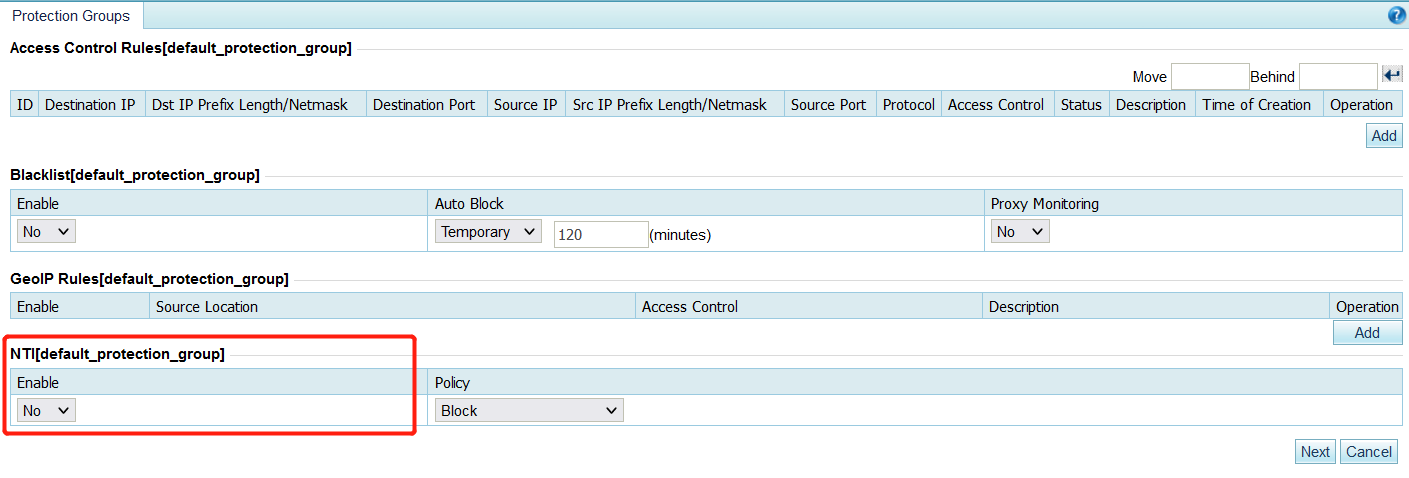
Or, choose Policy > Anti-DDoS > Protection Groups and click NTI under Access Policy.

Note: The NTI settings take effect for this group only when global NTI is enabled and the Protection Scope is set to Group under Advanced > NTI > NTI Configuration.

