
System Introduction
Currently, the ISOP system deployment includes a system disk and a data disk. The system disk primarily contains ISOP-related user information as well as the configuration directory for the A interface. The data disk is mainly used to store facility logs, configuration files, access logs, and event index files.
1. ISOP system disk
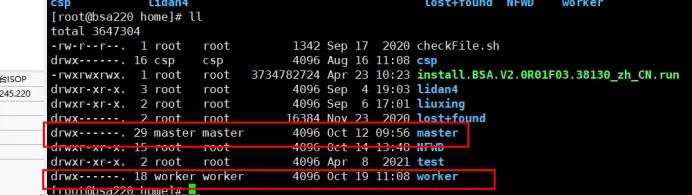
The two main directories on the system disk are /home and /opt. Among them, the /home directory contains two user file subdirectory: /home/master and /home/worker. The /opt directory is primarily used to store configuration information and logs related to the A interface.(Interface A is a device interconnection interface developed by NSFOCUS)
2. ISOP data disk
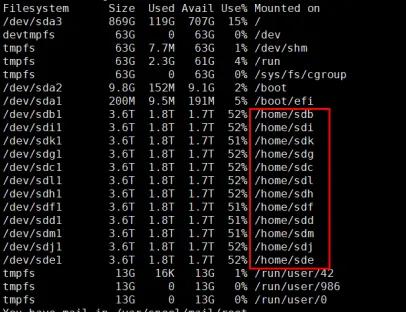
The Data disk designated for disk-based deployment is primarily used for deploying facilities during disk partitioning. It stores ISOP data, such as access logs and event index files, as well as facility logs and configuration files related to data storage.

System Disk Log Storage Instructions
1. /opt directory
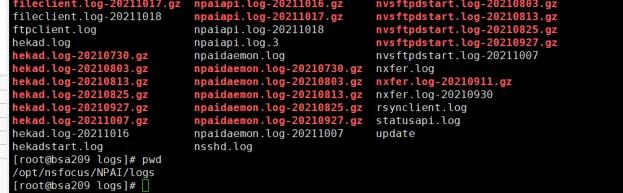
The /opt directory primarily stores information related to the A interface. A common log storage path is /opt/nsfocus/NPAI/logs/. This directory contains log directories specific to the A interface, such as the frequently encountered files hekad.log and nsshd.log. When the A interface encounters an exception, alerts are likely to be generated. Common scenarios include the hekad.log log file consuming excessive disk space, causing the root directory’s disk to become full, and the /opt/nsfocus/NPAI/data/sftp/bsa/tam_protocol directory containing excessively large files, which can also lead to disk abnormalities.
2. /home directory
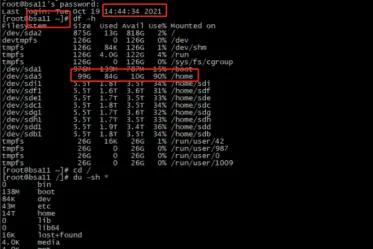
The /home directory is primarily used to store files for user master and worker accounts, as well as temporary files generated by Kafka. In some cases, Kafka creates temporary files that are automatically cleaned up after consumption is complete.
Component-related logs
Kafka-related parsing logs:
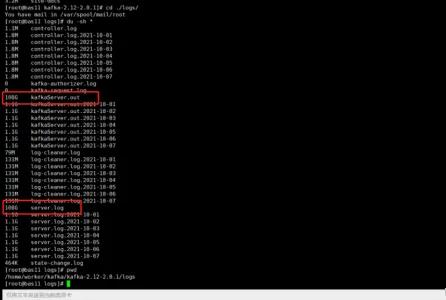
/home/worker/kafka/kafka/logs/server.log log and kafkaServer.out
A common issue is that the server.log log file occupies a large amount of disk space. You can restart the Kafka component to clear the log file (note: do not delete it), then review the server.log log file to identify the specific error messages.
ES Facility Log:
/home/worker/elasticsearch/logs/ISOP-XXXXXXXXXXXXX.log

PG database usage:
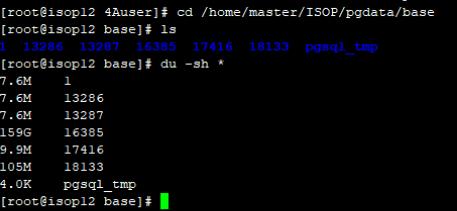
In some cases, PostgreSQL database tables can occupy a relatively large amount of space. By examining the directories layer by layer, we found that the PostgreSQL data directory itself occupies a significant amount of space.
Common directory: /home/master/ISOP/pgdata/base
Common Introduction to Data Disks
The data disk primarily stores log index data for the Elasticsearch cluster.
1. Database Table Configuration
The index files corresponding to log storage are also located in the /home/master directory. In many cases, having too many or excessively large indexes can lead to excessive index sizes and consume system space. Therefore, it’s necessary to promptly clean up the index files and configure retention parameters to ensure the platform operates normally.
Recommended configuration: It is recommended to configure the incident event index with a longer time retention period, while the bsa_traffic index should have a shorter retention period.
Configuration location: Configuration – Data Access – Database and Table Configuration
internal_isop_incident: Predictive Engine Event Index (Event Operations)
Internal_isop_event: Attack Detection Engine Event (from the event perspective; in ISOP Version F04 and later, this is merged into the Event Analysis Interface)
bsa_traffic: Traffic logs (session logs, connection logs, etc.)
bsa_nomal: Alarm Log (Device Alarm Log)
bsa_org: Raw log (device raw log)
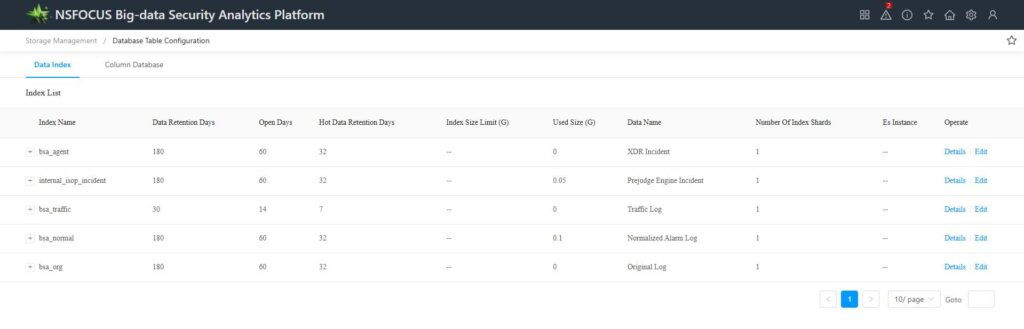
Number of days for hot data retention: Within the retention period, queries and modifications are allowed (e.g., submitting analysis and handling actions).
Open Days: Within the indexed open days, intelligent search and event analysis can be queried. Once the open days exceed the specified limit, querying is no longer possible, and the index enters a closed state. Data queries require manual activation from the backend.
Data retention days: Index data is retained only; data older than the retention days will be deleted.
Note: Manually adjusting the number of open days or retention days here will take effect only on index data that has been modified after the adjustment. Indexes that were already closed or deleted before the modification cannot be restored. The changes to the parameters will take effect the day after the modification is made.
2. Disk Configuration
You can now manually close indexes on the page to free up disk space, and you can choose different indexes to clean up.
Configuration: Storage Management – Backup and Cleanup – Data Cleanup
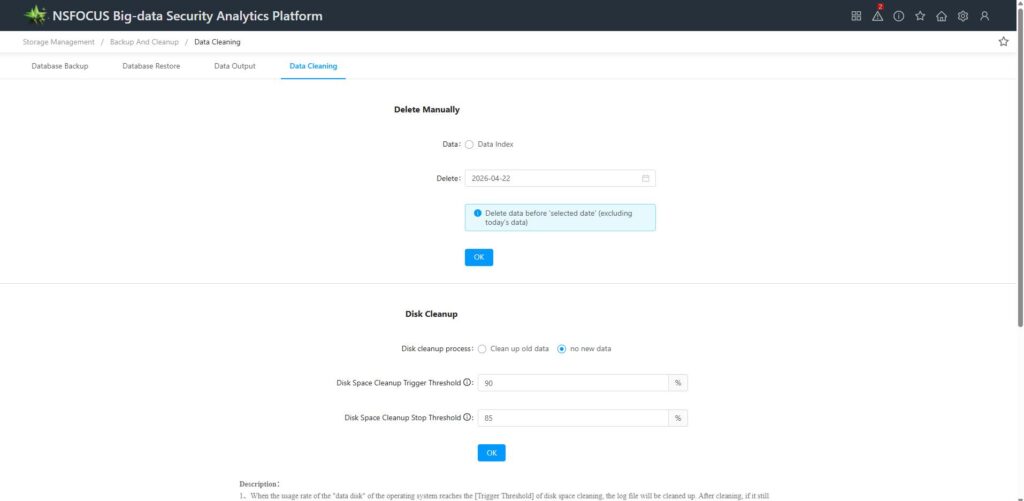
Disk Cleanup allows you to configure automatic cleanup settings. When the disk reaches the cleanup trigger threshold, it will perform cleanup according to the selected mode. Please read the instructions carefully.
Frequently Asked Questions
Problem 1: BSA System Log Issues
The /home/master/logs/PARSE.log log file has significantly increased in size.
Handling method: Restart the parsing task, clear the log files, and proceed with the CASE feedback process as usual.
Problem 2: /home/master/ISOP/ Application Component Log Files
Handling method: First, clear the log file, and then proceed with the CASE feedback process as usual.
Common operation commands: du -h –max-depth=1 // Displays the disk usage of the first-level subdirectories in the current directory
echo ” > filename // Two single quotes indicate that an empty string is written to the file, effectively clearing its contents.

