Overview Recently, NSFOCUS CERT detected that Jenkins issued a security announcement and fixed an arbitrary file reading vulnerability in the Jenkins CLI (CVE-2024-23897). Since one function of its CLI command parser is enabled by default in Jenkins, the specific parser function expandAtFiles can replace the character following the file path...

Ano: 2024
2023 Cybersecurity Regulation Recap (Part 1): Network Security
In 2023, countries worldwide continued to strengthen their cybersecurity capabilities and systems in response to their national needs, using regulatory means to enhance their cybersecurity management. Based on continuous tracking and research, NSFOCUS summarized the development of global cybersecurity regulations and policies in 2023, providing a brief commentary and presenting...
Collaboration Achievement: NSFOCUS and China University of Geosciences Article Secures Spotlight in Acclaimed Journal TIFS
In a recent achievement, the paper BABD: A Bitcoin Address Behavior Dataset for Pattern Analysis, a collaboration between the NSFOCUS research team and Professor Ren Wei's team at the Computer School of China University of Geosciences, has been featured in the prestigious journal IEEE Transactions on Information Forensics and Security...
GitLab Arbitrary File Write Vulnerability (CVE-2024-0402) Alert
Overview Recently, NSFOCUS CERT detected that GitLab officially released a security announcement and fixed an arbitrary file write vulnerability (CVE-2024-0402) in GitLab Community Edition (CE) and Enterprise Edition (EE). Due to path traversal issues, authenticated attackers can copy files to any location on the GitLab server when creating workspaces. The...
NSFOCUS SecLLM: A Paradigm Shift in Network Security
SANTA CLARA, Calif., January 25, 2024 – NSFOCUS, a leading innovator in cybersecurity solutions, is proud to announce the release of a cutting-edge Technical White Paper titled "Enhancing Network Security with Security Large Language Model (SecLLM)." This paper unveils NSFOCUS's latest technology, developed through years of expertise in artificial intelligence and security,...
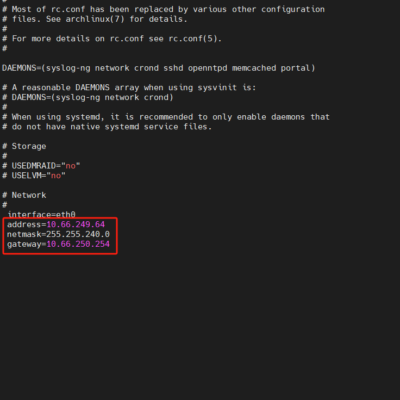
Configuring Management IP Address for ADS M Portal
After installing the ADS M portal, configuring a management IP address is necessary to deploy the portal on the ADS M and access its webpage. Follow the steps below to set up the management IP for the portal: 1. Access the Backend of the ADS M Portal: Log in to...