

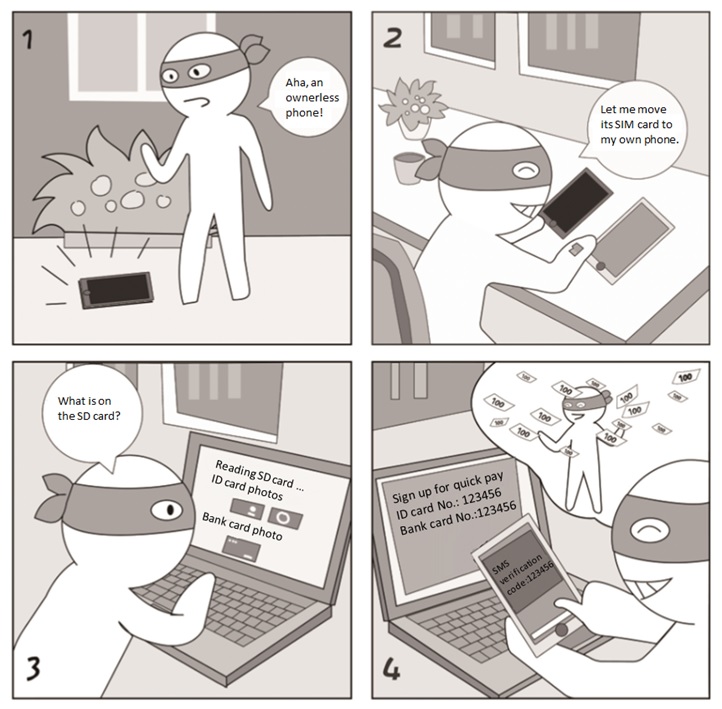
If you do not report the loss of the SIM card after your phone is lost, a hacker may use it to obtain SMS verification codes. Activation of the quick pay service requires only the ID card number, bank card number, and SMS verification code.
Security Tips/Takeaways
- Set a PIN code for your SIM card. When restarting the phone or using a new phone, you must type the PIN code for proper use of the phone.
- Do not store sensitive information, such as ID card photos, bank card photos, and business documents, on your phone or SD card to avoid misuse by a hacker who accidentally finds your lost phone.
Mobile Office——Data Wiping Before Phone Resale
Case AnalysisCase Analysis
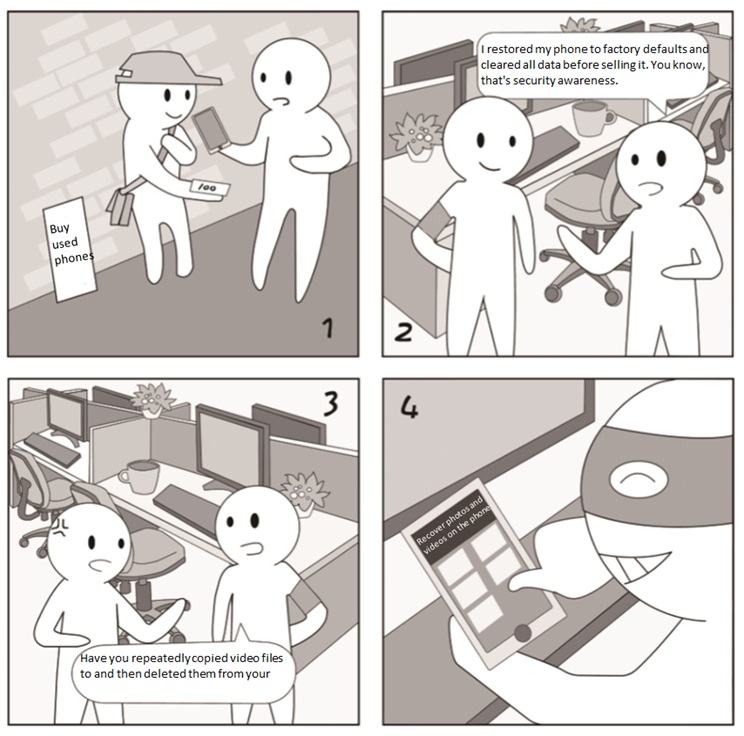
Restoring a phone to factory defaults aims to restore system files and delete the user’s data. In fact, it cannot work as expected as the user’s data is not thoroughly removed, but still on the phone’s storage chip, as is true of file deletion on a computer.
Security Tips/Takeaways
- Before selling a used phone, besides restoring it to factory defaults, you should repeatedly copy large video files to and then delete them from your phone.
- Geeks can flash a used phone by using a ROM from a third-party vendor to thoroughly wipe account information that may survive the previous wipe operations.

