

GoAhead is an open-source web architecture that is widely used in embedded systems thanks to its high performance and high availability. Traditional servers built on the GoAhead architecture usually see a large number of dynamic pages written in the Active Server Pages (ASP) scripting language and functions written in C/C++ that are registered to the scripting layer for ASP scripts’ invocation. For the purpose of more thorough security audits, we should not only understand how these functions are implemented but also analyze how ASP scripts are handled. This article uses the firmware of a certain switch as an example to illustrate how to extract ASP files when GoAhead is involved.
GoAhead Version
Before analyzing the firmware embedded with GoAhead, we should know which version of GoAhead is used so as to learn what vulnerabilities (with CVE IDs) pose a threat to the security of the firmware and, more importantly, base our analysis on the correct source code and rapidly identify key issues.
Obtaining Version Information
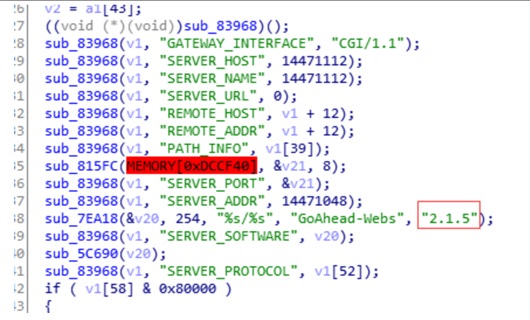
You can rapidly obtain the version number of GoAhead by simply searching the firmware for the string “GoAhead”. Here, the version number is 2.1.5, as shown in the following figure.
Downloading the Source Code
As the source code of GoAhead is no longer maintained on GitHub and the legacy versions on the vendor’s official website are available only to Enterprise Edition customers, it is impossible to obtain the source code from official channels.
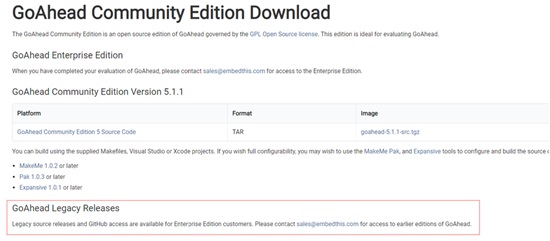
Therefore, we had to turn our eyes to the resources shared by other users and, luckily, found the source code of version 2.1.5. Then we downloaded a similar version, 2.1.8, from the CSDN website.
ASP Files
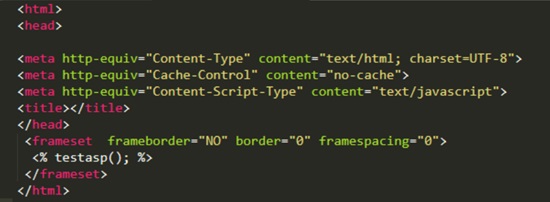
The GoAhead web server supports an ASP-like server-side scripting language, which uses almost the same syntax as Microsoft’s ASP. These scripts can effectively shorten the time to develop dynamic pages. Following is a snippet of typical ASP code, which is embedded in “<%…%>”, where the testasp function is implemented in the C/C++ layer.
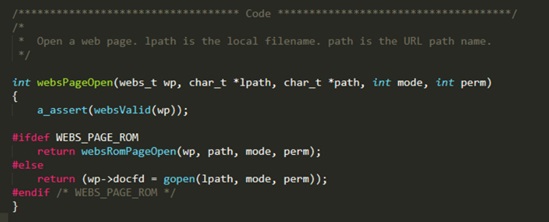
For better portability with different embedded systems, GoAhead provides very flexible methods to store files. For Linux systems, users are allowed to store files in the file system. For systems like the Embedded Configurable Operating System (eCOS), files are directly built into the firmware in the form of arrays, making an independent file system module unnecessary. In the following source code, the WEBS_PAGE_ROM macro controls how ASP files are stored on different systems. If WEBS_PAGE_ROM is defined, files will be stored in the firmware as arrays.
- For an ASP script file stored in the file system, use Binwalk to extract it and then analyze its code logic.
- For an ASP script file built in the firmware, Binwalk is of no or limited use. In other words, we have to extract such files manually.
Storage Format
To learn the storage format of an ASP file, we must first understand how this file is converted into arrays:
- Create a txt file that lists paths of files that need to be converted.
| 1 2 3 4 | D:/web/css/style.css D:/web/home.asp D:/web/images/button.jpg |
- Run the following command to convert txt into arrays:
webcomp D:/web files.txt >romfiles.c
- Open c, which contains websRomPageIndex, a global variable file index table.
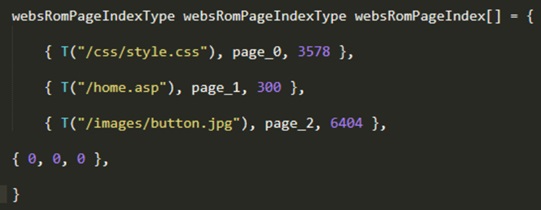
Pages are the converted arrays.

In romfiles.c, we can also view how the websRomPageIndexType structure is defined. To extract all listed files, we should first locate websRomPageIndex in the firmware. Then we can write a script to extract these files according to their specific formats.
Locating the Index Table
Signature-based Locating
Let’s go back to the source code of GoAhead. To identify websRomPageIndex, the first step is to find where it is called. It turns out that the websRomPageReadData function uses this table and copies its data to a specified buffer.
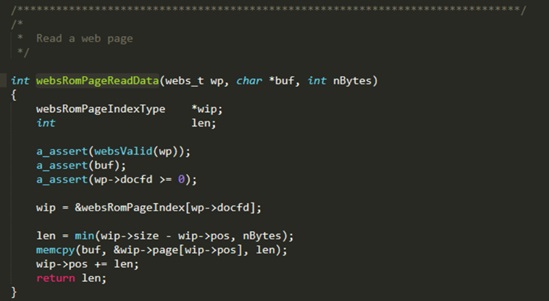
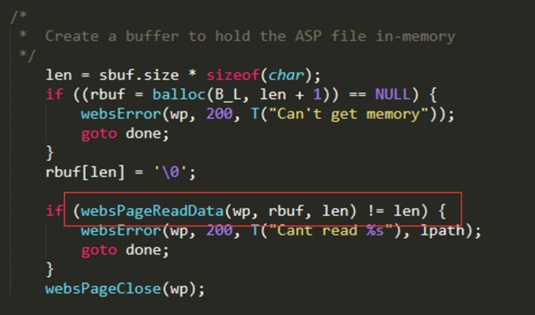
Next, we need to check where the websRomPageReadData function is called and find a signature string suitable for locating functions. In this context, the signature string is “Can’t read %s”, based on which the websAspRequest function can be rapidly located in the firmware.
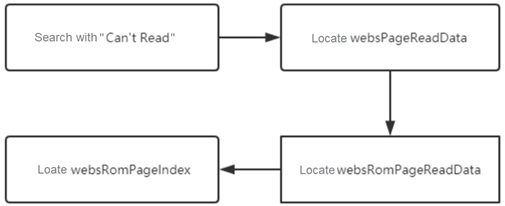
Locating Process
The whole locating process can be summed up as follows:
Hands-on Practice
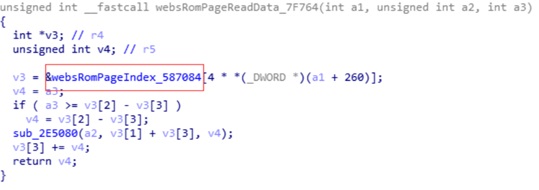
Locating websRomPageIndex
Find the websPageReadData function by using the “Can’t read” string. What is enclosed in the red frame in the following figure is this function.

Analyze the function to find the websRomPageIndex table.
Writing a Script
After the websRomPageIndex table is found in the firmware, write the following script to extract file data:
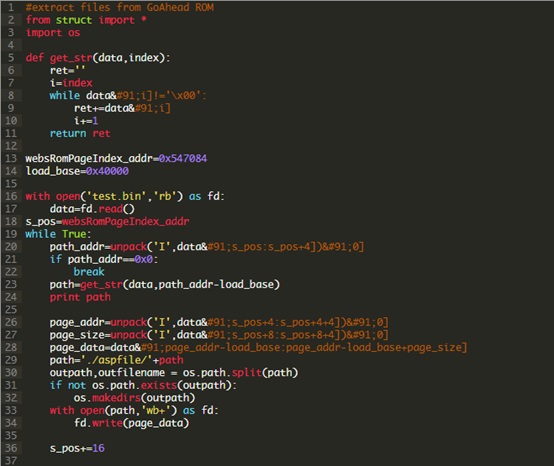
Files extracted are as follows:

Sum-up
This article presents a method for extracting ASP files. Simple as the method is, the analysis process can be time-consuming, calling for patience and carefulness. After an ASP file is extracted, you can check its source code to identify potential security issues in the file. The method of auditing code is similar to that of web audits and so is omitted here.

